Answers before you ask.
Everything directors and players ask about running an event on Pitbosser, organised by topic. For longer reads, head to the Blog.
Setting Up Your Club
For directors
How do I create a club?
Sign in, and if you don't belong to any club yet you'll land on a "Create a club" screen. Give the club a name and submit — you're automatically made its director. If you already belong to a club and want to start a second one, open the club switcher in the top nav (next to your account menu) and click "+ New club" at the bottom of the dropdown. Either way, your new club starts pre-loaded with a set of default blind, scoring, and payout structures, plus a starter bounty type, so you don't have to build everything from scratch.
How do I invite players to my club?
Go to Club Settings → Players and click "+ Add player." Fill in at least a display name — email, phone, and date of birth are optional. If you enter an email address, the player gets an invite email with a link to set their own password and sign in. You can also tick "Include in all-time rankings" and the two communication checkboxes while adding them.
Every field and button, in order: how to invite and manage poker club members.
Can I add a player with no email address?
Yes. Only the display name is required. Adding a player without an email creates a placeholder profile — useful for tracking someone's results and points when they don't want to (or can't) log in themselves. You can still register them in series, knock them out, award them bounties, and see them on leaderboards exactly like any other player. If they later want their own login, edit their row and add an email address.
How do I upload a club logo and ClubHome artwork?
Go to Club Settings → Manage. The logo (square, 256×256 px recommended, JPEG/PNG/WebP, up to 450 KB) shows in the Club Home banner. The artwork (wide landscape image, up to 1000 KB) is the background behind the hero card on Club Home. Upload either one and it takes effect immediately.
By the way, you can also customise your tournaments/series by adding a separate tournament logo. You do it in the Lobbby
How do I manage the messages shown on the club's home page?
Go to Club Settings → Messages. Add a message with an optional bold header and a required body of text, then toggle "Show on home" to control whether it appears. Messages with that toggle on rotate automatically every 5 seconds in the carousel on the Club Home page. You can edit or delete any message at any time.
What is Club ID (Cid) and what do I need it for?
Your club's Cid (shown as something like Cid-7K9M) is a permanent code for your club, visible only to directors on the Manage tab in Club Settings.
Your club name may be changed, but Cid stays with you.
It's a quick way to identify your club when something needs to be looked up — for example, it's automatically attached to any support ticket you file, so Pitbosser support can find your club fast.
Building a Series
For directors
How do I create a new tournament / series?
Go to the Tournaments/Series page and click "+ New" (only directors see this button). That opens the Lobby, where you name the series, pick a logo, a season, choose your buy-ins, blind/scoring/payout structures, and a bounty type. Once the setup is complete, use "Register players" to enroll the field, and the series is ready to run.
Step by step, with screenshots: how to set up a poker tournament series.
What is the Lobby, and what do I set up there?
The Lobby is the director-only setup screen for a series, reached from the Series list or from the Clock page. It has five sections: series info (name, season, single/multi toggle, buy-ins, currency, logo, bounty type), blind structure (with the freeze-out/re-entry toggle), a read-only Starting Stack preview, scoring structure, and payout structure (with the rake toggle). The "Register players" button, to enroll the field, also lives here.
How do I register players for a series/event?
In the Lobby, click "Register players." A modal opens with your club's player list — each row shows the player's Pid tag, and the search box matches on name or Pid. Check the players you want enrolled and save. Registration is only available once the series setup is complete, and it locks automatically once an event is in progress.
What is the difference between Single and Multi event series?
This is the "Single / Multi" toggle in the Lobby's series info section.
Single (default) means the whole series is essentialy a tournament. It consists of just one event, the series buy-in is forced to zero (it's redundant), and the "Next event" option is hidden once that event finishes.
Multi means you are setting up the actual series of multiple events sharing same name, buins, blinds etc. The series spans multiple events / micro tournaments (e.g. turbos) across one or more days, with cumulative standings and total prize pool depending on how many events are played (each event has a buy-in). When event is finished (all pleyers eliminated), director has option to spin-up next event (one click) or to finish the series (that will recalculate payouts and standings.
You can't change this setting after the series has started.
What's the difference between Freeze-out and Re-entry format?
Freeze-out format (the default) means once you're knocked out of an event, you're done for that event.
Re-entry format means a knocked-out player can pay the event buy-in again and come right back in, up to a maximum number of times you set — and only up until a level cutoff, if you choose to set one. If rake is set, re-entry is subject to it. Re-entry decision is instant - must be taken immediately after knockout. There is no "grace period".
You pick the series format in the Lobby.
Pitbosser does not support re-buy or add-on formats
Can my club charge rake, and how do I set it up?
Yes. In the Lobby's payout section, turn on the Rake toggle, then choose either a flat amount or a percentage and enter the value. Rake is taken out of the prize pool before payouts are calculated, so players are paid from the pool after rake, not before.
How do blind structures work, and can I build my own?
A blind structure is the ladder of blind levels (small blind, big blind, ante, duration, and any breaks) that the clock runs through during an event. Pick an existing template in the Lobby, or build your own in Club Settings → Blind Structures — either by hand-editing a level table, or by using the Level Generator, which builds a full ladder for you from inputs like expected player count, target time to heads-up, starting stack depth, and pace.
How does scoring work? Can I build my own scoring system?
Scoring templates award points based on where a player finishes in an event. There are two kinds:
- "Position based", a simple points-per-finish-position table you edit yourself.
- "Field Weighted" more advanced formula used by large tournament operators, that scales points to the buy-in and number of entrants so a big field is worth more than a small one.
Build and edit both kinds in Club Settings → Scoring Structures, and pick one per series in the Lobby.
How do payout structures work? Can I build my own?
A payout structure decides what percentage of the prize pool each finishing position wins. You can build or modify existing templates using methods supported by Pitbosser:
- Manual template -you set a fixed percentage of the pirze pool per paid position, and they must add up to 100%),
- Geometric formula - distributes the prize pool so each position gets a fixed percentage of the position above it, rewarding higher finishes with bigger prizes through a smooth, predictable decay.
- Power Law formula - distributes the prize pool so each position gets a share based on 1 divided by their finishing position, raised to a power; rewarding higher finishes with dramatically bigger prizes near the top, then flattening out toward the bottom.
Manage these in Club Settings → Payout Structures; every series uses the same template for both its event payouts and its final series payout.
Check out our blog articles explaining Geometric and Power Law payout formulas in detial.
How does rounding work in payouts? Im gettting weird payout results.
Every payout starts as a straight percentage of the prize pool. That raw number then gets rounded down to whatever ROUND TO unit your club's payout template uses, say, the nearest $10.
Because every spot gets rounded down, there's always a bit of money left over, and all of it goes to 1st place. That's the main reason a winner's payout looks bigger than the flat percentage alone would suggest.
Some more rules that shape the final numbers:
- no paid spot can round down to $0. Every paid spot gets at least one rounding unit ($10 in the example above), even if the raw percentage was low enough to floor to zero.
- And if rounding leaves the total short of the prize pool, the shortfall gets trimmed off the bottom spots first, one unit at a time, while keeping each of them at or above that minimum.
- Only if the pool is genuinely too small to give every paid spot even one unit do the bottom spots get zeroed out.
So the two spots most likely to look "off" compared to a plain percentage calculation are
- 1st place (a bit higher, it absorbs the rounding leftover)
- last paid spot nudged up to the minimum, or trimmed down if the pool is tight.
What are bounties and how do I set them up?
A bounty is a point the director awards a player during play for something notable (like knocking out another player, knocking out a celebrity player or a bad beat).
Bounties are usually rewarded by the club in some way.
In Pitbosser bounties are tracked completely separately from scoring points ans payouts, on its own Bounty Trophy leaderboard.
First, create reusable bounty types (a name, a colour, and an optional description) in Club Settings → Bounty types. Then, in a series's Lobby, pick one bounty type for that series (or "No bounty" to turn bounties off for it). The award button on the Clock and Remote pages is labelled and coloured to match.
There could be only one bounty type selected per series.
Structures & Templates
For directors
How many blind, scoring, and payout structures can I have?
That depends on your plan.
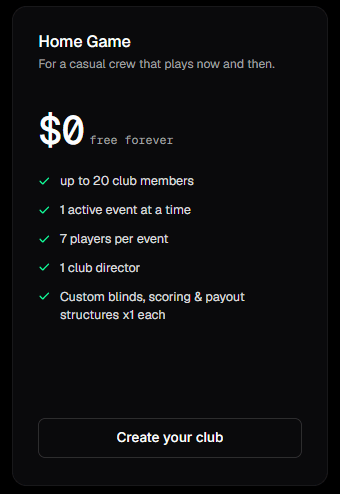
- On a free plan, besides pitbosser predefined structure, you are able to define one additional custom structure, for a total of two per category (blind, scoring, payout). Heads up! You are able to modify pitbosser predefined templates to fit you club needs.
- On paid plans there are no limitations. Have as many as you need.
What is a "Field Weighted" scoring template?
It's a scoring method that calculates points with a formula instead of a fixed lookup table: points = square root of (buy-in × number of entrants ÷ finish position), multiplied by a bonus for the top 7 finishers.
That bonus defaults to 1.5 for 1st place down to 1.2 for 7th, and you can edit each one; every position from 8th down uses a multiplier of 1.0.
This rewards strong finishes in bigger or higher buy-in fields more than the same finish in a small one. The editor includes an Example Score Calculator so you can test the numbers before saving.
Check out our blog article for detaild description.
How does chipsets work?
A chipset is a named list of the physical poker chips your club owns — each denomination has a value, a quantity, and a display colour.
Manage them in Club Settings → Chipsets.
Chipsets feed two other tools: the Blind Structure Level Generator uses them to round blind levels to clean chip values, and the Starting Stack tool uses them to deal out a colour-coded chip breakdown for each player.
Why can't I delete this blind structure / bounty type?
Because it's still being used by a series that hasn't been closed yet.
Blind, scoring, and payout structures, and bounty types can only be deleted once no active (non-closed) series references them anymore. The app shows a clear message explaining this and tells you the series has to finish first.
Once that series is closed, deletion is unblocked.
Running an Event
For directors
How do I start an event, and start the clock?
Open the series lobby and click "Play" button.
Play button is enabled only when Setup complete is checked and you have registered players.
Before your first event, you'll see a confirmation modal asking you to double-check that any no-show players are already marked out — it shows how many players are currently marked absent. Confirm, then press the ▶ Start button to begin the countdown at Level 1.
Prefer to watch? The poker tournament video tutorials run a whole game night, start to finish.
How do I knock a player out?
One sentence?: Klick on the players knockout button. That's it.
Need more words?:
- On the Clock page (or the Remote), find the player in the "Players in play" list.
- Scroll the list or enter players name or Pid into the search box.
- Once you identified the player click their Knock out button.
- It's Done. You don't need to do anything else.
The system will record the elimination and allocate points depoanding on the finishing position. If player fininsged In The Money, the payouts will be calculated once event is completed.
In a series with re-entries allowed, a modal appears first, letting you choose "Re-entry" or "Final KO" before anything is saved.
Can I undo a player knockout or a bounty point?
Yes, both are reversible.
If the clock didnt advance to next level:
- Click a knocked-out player's "OUT" tag to reinstate them. This only works while the clock hasn't moved past the level they were knocked out at; once it has, reinstating is locked.
if the clock did advance, you can either:
- Rewind the clock to previous level, reinstate the player, then fast forward to the desired level.
- Continue as if nothing happened and edit the event results (position finished, points and possibly payouts) once the event is completed (lobby -> playlog -> edit results). This can be cumbersome, especially for big tournaments. Plan it well.
For bounties, Ctrl+click the Award bounty button to subtract one instead of adding one.
Can I edit tournament/series results while it's running? What about after it's finished?
You can open the Edit Results page for a series at any time (lobby -> playlog -> edit results), but editing only applies at the event level.
Any event that's still live shows as locked, read-only rows labelled "Live · locked" — you can't change it while it's running, because its results are still changing.
Once an event finishes, its results become fully editable, whether the series itself is still going or already closed.
What is the Remote, and how do I use it?
Remote is in preview mode.
The Remote is a phone/tablet-sized companion page you open directly on phone/tablet by pointing your browser to remote.pitbosser.com. You need to login as directior and select the active series form the list.
It is meant to controll the game while you are away from the desktop. There are many usecases, e.g.
- You can have a remote at every table, operated by the dealer to control eliminations at his table, or
- you are walking around the room while the main Clock stays on a laptop or desk screen.
Remote is a simplified but equal controller, not a backup — you can start/pause the clock, change levels, knock players out, award bounties, and finish the day or event, all from your phone or tablet. It keeps a screen wake lock so your phone display stays on.
How do I award a bounty (and undo one)?
Click the "Award bounty" (or "+ Bounty") button next to an active player's name on the Clock or Remote page — each click adds one. To undo one, Ctrl+click the same button, which subtracts one. The button is labelled and coloured to match the series's bounty type, and it's hidden entirely if the series has no bounty type set.
How do I skip a blind level or jump to another one?
Use the "Skip level" control on the Clock or Remote to move forward one level, or click directly on any row in the blind structure table on the Clock page to jump straight to that level — handy if you need to correct a level or speed things along.
How do I handle a player who is registered but didn't show up?
Knock them out before you start the clock, the same way you'd knock out anyone mid-event. This marks them "absent" — they earn no points and aren't counted toward that event's prize pool, but they stay registered and can play in later events in the series. The Start confirmation modal shows you how many players are currently marked absent before the clock begins.
I knocked out the wrong player. How do I put them back in?
If the clock didnt advance to next level:
- Click a knocked-out player's "OUT" tag to reinstate them. This only works while the clock hasn't moved past the level they were knocked out at; once it has, reinstating is locked.
if the clock did advance, you can either:
- Rewind the clock to previous level, reinstate the player, then fast forward to the desired level.
- Continue as if nothing happened and edit the event results (position finished, points and possibly payouts) once the event is completed (lobby -> playlog -> edit results). This can be cumbersome, especially for big tournaments. Plan it well.
What happens when only one player is left?
The app automatically shows an end-event screen with the winner's name, avatar, and payout, plus a full ranked list of every player's finish position, bounty count, and payout. From there you can choose "Finish Series" or, unless it's a single-event series, "Start next event."
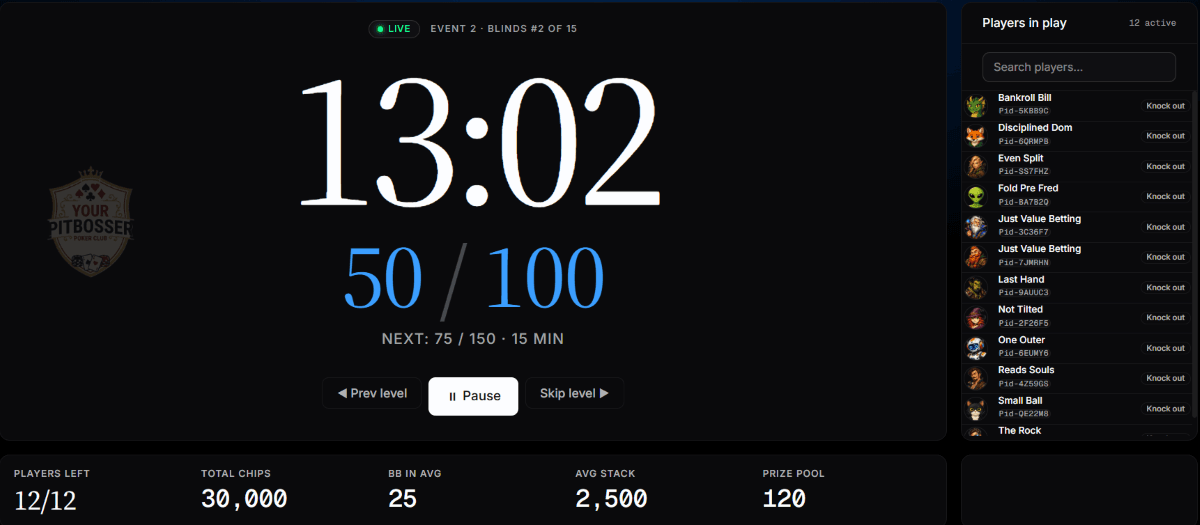
What is the data I see on the clock page?
The regular Clock page view.
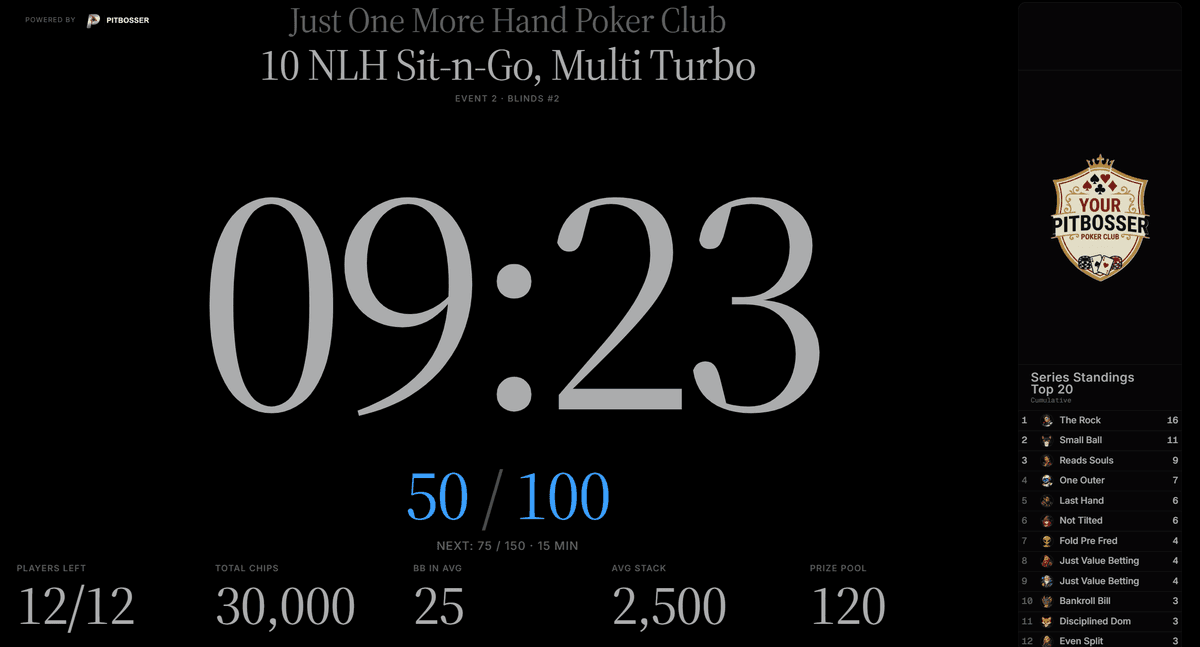
TV Clock view.
Why does the clock on my phone or in the app look a second or two off from the big TV?
Every screen — the Clock, the Remote, and the TV — recalculates the time remaining independently from the same starting point, using its own connection to the server's clock. Small network delays can occasionally make one screen show a second or two more or less than another, but it corrects itself continuously and never drifts further out of sync.
Finishing & Results
For directors
When does the event/series finish?
An event finishes the moment one player remains and you confirm the end-event screen. A series finishes when you click "Close Series" after its final event — this is the step that locks in the overall series standings.
How do I close a multi event series ?
Open the series (from the Lobby or Series list) and click "Close series." Confirm, and the app finalizes standings and distributes series payouts. You'll then be prompted with the option to send the results by email to everyone registered.
Single event series close automatically when event is finished
The full walkthrough: how to close a poker tournament series and share results.
How do I email the results to players?
After closing a series, use the "Send results email" action — it sends a formatted results email (champion spotlight, standings table, day-by-day breakdown) to every player registered in that series, using the email address on file for each of them.
For already finished series you can resend the results email form Series Details page
How do I fix a mistake in an event's results after it finished?
Go to the Edit Results page for the series, find the finished event, and adjust finish positions, points, bounty counts, or payouts directly in the table. Use "Save All" to save every finished event's changes at once and recalculate the standings.
Prefer to watch? One of the poker tournament video tutorials walks through correcting results.
I edited results after closing. How do the standings update?
Saving changes on the Edit Results page automatically recalculates the series standings — finish positions and series payouts are recomputed for every player in one pass, so everything stays consistent even after the series is closed. You don't need to re-close the series.
Managing Players & Data
For directors
How do I remove a player from my club? (and why is it sometimes blocked?)
?????
Go to Club Settings → Players and remove them from there. This is blocked if the player is currently registered in a series that hasn't finished (any status other than closed) — you'll see a message explaining the series has to finish first. Once every series they're in has closed, you can remove them freely. Removing a player only takes them out of your club; their account and profile aren't deleted.
How do I reset a player's password?
Open their edit drawer in Club Settings → Players and click "Reset password" — this sends them a password-reset email. The button is only available in the edit drawer, and it's greyed out with a tooltip if the player has no email address on file.
What does "Include in all-time rankings" do, and how do I change it?
It's a checkbox you set when adding or editing a player.

Turned on (the "Active" green pill), the player counts toward the all-time and season leaderboards.
Turned off (the "Guest" blue pill), they still appear in that specific series's own results, but they're excluded from the club-wide leaderboards
Useful for occasional or one-off players you don't want skewing your rankings.
How do I create and use seasons / leagues?
Manage seasons (or leagues) in Club Settings under the Seasons section — give each one a name and a year. When creating or editing a series, assign it to a season. Leaderboards can then be filtered by season, so you can compare a single year's results or view everything all-time.
How do I hide players' financial figures from each other?
Go to Club Settings → Manage and find the Player Privacy card.
There are five toggles: Hide ROI, Hide net winnings, Hide payouts, Hide buy-ins, and Hide rake amount.
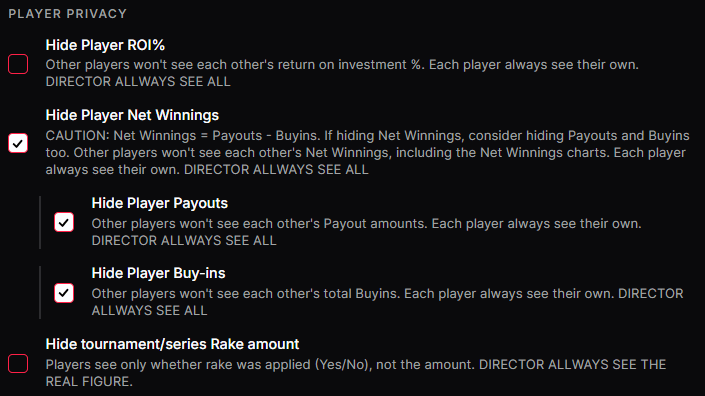
Turn any of them on and other players see a "Hidden" placeholder instead of that number (rake shows Yes/No instead).
Directors, and each player looking at their own numbers, always see the real figures no matter what.
What are Pid and Cid, and who can see them?
Pid is a permanent code assigned to every player (like Pid-4K9X2M); Cid is the equivalent for a club (like Cid-7K9M).
Directors see player Pids on player lists and search results to help identify people with similar names; each player also sees their own Pid on their profile.
Cid is shown only to directors, on Club Settings → Manage.
Both are meant purely for identification within the app's screens.
Can I get my club's data out of the app?
Yes, of course! We don't keep our users hostage :)
Your club'd data is yours.
As a director you can export CSV files of your players, series, seasons, blind/scoring/payout structures, event results.
Each export is available from its own download link and comes out as a spreadsheet-ready CSV file.
Can I import historical data from a spreadsheet?
Yes. Directors can bulk-import players, series, seasons, blind/scoring/payout structures, event results from a CSV file, matching the same layout as the exports. This is meant for bringing in records from before your club started using the app, or for restoring a backup. The app reports back how many rows were created, skipped, or failed.
Why does my club say it's suspended, and how do I fix it?
A suspended club has been paused by Pitbosser — you'll see a red banner, and all of your data stays visible, but no new changes can be saved (starting events, editing settings, and so on are all blocked). This isn't something a director can undo themselves; contact Pitbosser support to find out why and get it resolved.
Getting Started
For players
How do I create an account?
There's no public sign-up page — you can't create a Pitbosser account on your own. Accounts are created by a club director: once one adds you as a player in their club, you'll get an invite email with a link to set your password and sign in. See "How do I join a poker club?" below.
How do I join a poker club?
You can't join a club yourself — ask the club's director to add you in Club Settings → Players. A display name is all they need; if they also add your email address, you'll receive an invite email with a link to set your own password and sign in (see "I got an invite email. What do I do with it?" below). Without an email on file you won't get a login of your own, so you will not be able to track your standing and leaderboards yourself, but the director can still register you in series and track your results.
I got an invite email. What do I do with it?
Click the link in the email — it signs you in automatically and takes you to a short welcome page. Enter a new password there (at least 8 characters, and confirm it), and you're set. From there you're taken to your profile page, where you can fill in the rest of your details.
Can I sign in with Google instead of a password?
Not at the moment — email and password is the only way to sign in today.
I forgot my password. How do I reset it?
If you're still signed in somewhere, open your account menu in the top right and click "Change password" — this sends a reset link to your email. If you're fully locked out and can't sign in at all, ask your club's director to reset it for you from their Players list; that also sends you a reset email. There's currently no "forgot password" link on the sign-in screen itself for a locked-out user to trigger this themselves.
Why did the app log me out on its own?
To keep your account secure, you're automatically signed out after 60 minutes with no activity (no mouse movement, typing, touch, or scrolling). A warning appears 5 minutes before that happens, with a "Stay signed in" button that resets the clock. If you have the app open in more than one browser tab, activity in any of them keeps you signed in everywhere.
Why was I signed out the moment I opened the app in a new window?
If you closed every other tab or window with the app open, and then open it fresh again later, the app checks whether you were really away — if no other tab was active and it's been a little while since you last signed in, it signs you out for safety rather than leaving an old session open indefinitely. If you're switching windows while you're actively using the app, this shouldn't happen.
Understanding the App
For players
What's the difference between a series, an event, and a tournament?
A series is the overall competition — it can run across multiple days and is made up of one or more events (i.e. tournaments).
An event is a single sit-and-go session: everyone buys in, plays down to a winner, and that event ends.
Tournament is just another word people use for event.
What do the series statuses mean (pending, registering, running, finished)?
The app currently uses these stages:
 the director is still setting it up
 players are being enrolled but it hasn't started

its first event has started
 the series has started, events have been played, but the play has been suspended
 the director has finished it and locked in final standings
What are points, and how do I earn them?
You earn points at the moment you're knocked out of an event (or when you win it), based on your finish position and the series's scoring template. Points from every event in a series add up to your series standings, and series standings feed into the club's leaderboards.
What are bounties, and how are they different from points?
Bounties are awarded manually by the director during play, for anything the club decides to reward (like eliminating another player or a celebrity player, or a bad beat) — they're completely separate from scoring points and don't add to your point total. They only count toward the Bounty leaderboard.
What do "series buy-in" and "event buy-in" mean?
The series buy-in is an optional one-time entry fee for the whole series, paid once when you register. Think of it as series ticket; it funds the prize pool paid out at the end of the series.
The event buy-in is paid for each individual event (sit-and-go) within the series, and funds that event's own prize pool. If a series allows re-entries, each re-entry costs another event buy-in.
What is a season / league ?
A season / league is just a label a director attaches to a series — for example, "2026 Season." It lets leaderboards be filtered to show only that season's results, or "all seasons" combined. You club can have multiple seasons / leagues.
What's the difference between a player and a director?
A player has read-only access — you can view leaderboards, stats, and the live clock, but you can't set anything up or run an event. A director has full control of the club: creating series, running the clock, editing settings, and managing players. These roles are set per club, so your role can be different in each club you belong to.
What does "Guest" vs "Active" mean next to a player's name?
It reflects the "Include in all-time rankings" setting a director controls. "Active" (green) means the player counts toward the club's all-time and season leaderboards. "Guest" (blue) means they're excluded from those club-wide leaderboards, even though their results in any series they play still show up normally.
Can a director also play, and can a player be a director in a different club?
Yes to both. A director can register and play in their own club's series just like anyone else. And since roles are set per club, you can be a director in one club and a player in another.
Can I hide some sensitive data from public view?
Not on your own — hiding financial figures (like ROI, net winnings, payouts, buy-ins, or rake) is a club-wide setting only your club's director can turn on, and it applies to everyone in the club, not one player at a time.
If you'd like your numbers hidden from other members, ask your director to turn on the relevant toggle in Club Settings.
Live Play
For players
What is TV Mode, and how do I use it?
TV Mode is a full-screen display meant for a connected TV or monitor in the room — it shows the live clock, blinds, standings, and a winner screen.
A director opens it from the Clock page's "Open TV mode" button, which launches it in its own window that can be casted to the connected tv or monitor.
What does "BB in avg" mean on the clock?
It's the average chip stack across all remaining players, expressed in big blinds — the average stack size divided by the current big blind. It's a quick way to see how deep the average stack is relative to the blinds right now.
What does "absent" mean for an event?
It means a registered player was knocked out before the clock even started — in other words, they didn't show up. They earn no points and aren't counted in that event's prize pool, but they're still registered for the series and can play in later events.
What is a re-entry, and what does the "x2 RE" tag mean?
In a series set up to allow re-entries, a player who's knocked out can pay the event buy-in again to come back into that same event, up to a set maximum number of times.
Re-entry decision is instant - must be taken immediately after knockout. There is no "grace period".
The "x2 RE" pill next to a player's name shows how many times they've re-entered so far.
Stats & Leaderboards
For players
Where do I see my own stats, and what are they?
Go to Player Stats and select yourself.
You'll see a stats grid covering things like all-time points, event and series wins, 2nd/3rd place finishes, win percentages, ITM percentages, ROI, and average finish position, plus charts of your points and ROI over time and your net winnings.
Can anyone else see my stats?
Yes — any member of your club can look up any other player's stats page.
Some financial figures (like ROI, net winnings, or payouts) may be replaced with "Hidden" for other viewers if your club's director has turned on that privacy setting; you and your club's directors always see your actual numbers regardless.
Can I download my own results and data?
Yes. On your own Player Stats page there's a Download button that exports your data as an Excel file.
What does ROI mean?
ROI stands for return on investment. It's calculated as (total winnings − total buy-ins) ÷ total buy-ins × 100, shown as a percentage. A positive number means you've won more than you've spent on buy-ins; a negative one means you're down overall.
What is the All-time leaderboard?
It's the club's overall points ranking across every series, giving equal weight to each series regardless of size. You can filter it by season/league, or view it across all seasons combined.
What is the Bounty leaderboard?
It ranks players by how many bounties they've earned, shown as a separate card for each bounty type your club uses. Only players with at least one bounty of that type appear on its card, and you can filter by season.
What do "ITM" and "ITM%" mean?
ITM stands for "In The Money" — it means you finished in a paid position. ITM% is how often that happens: the number of times you finished in the money divided by the number of events (or series) you played.
What does the Δ (delta from leader) column mean?
It shows how far behind the current leader you are in that ranking — the leader's value minus yours. The leader always shows 0; everyone else shows a negative number representing the gap they need to close.
Profile & Account
For players
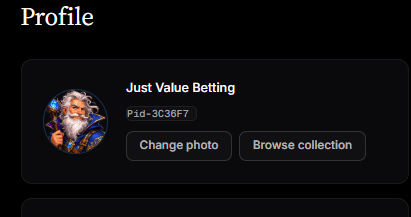
How do I change my profile avatar?
Go to your Profile page. Click "Change photo" to upload your own picture, or "Browse collection" to pick from a shared gallery of avatars your club's directors have made available. Either way, it updates immediately — no extra save step needed.
How do I change my display name?
Go to your Profile page, edit the Display name field, and click "Save changes." This is the nickname shown everywhere else in the app.
What is the "Pid" code shown on my profile?
It's your permanent player ID (something like Pid-4K9X2M) — a unique code the app uses to identify you, shown read-only near your display name. It doesn't change and is mainly used by directors to tell apart players with similar names.
How do I turn email notifications on or off?
On your Profile page, under Communications, there are two checkboxes: "Send me club messages" and "Send me tournament results." Untick either one to stop receiving that type of email, and save your changes.
Can I change my email address?
Not yourself — your email is shown read-only on your Profile page. If it needs to change, ask a director in your club to update it for you from Club Settings → Players.
Can a player belong to more than one club?
Yes. If you belong to more than one club, a club switcher appears in the top navigation letting you jump between them — just pick the club you want from the dropdown.
How do I change my accent colour?
On your Profile page, pick one of the five colour swatches (orange, blue, green, red, or yellow). This colour is used as the background behind your avatar initials and as a highlight in the navigation menu.
Pricing, Privacy & Data
For players
Is Pitbosser a free app, and do I need to pay to join a club?
Pitbosser is always free for players.
If you would like to setup a club, there is one free and 2 paid tiers.
All tiers enjoy exacly same functionality. They only differ in limitations, eg club can only have one live event at a time and maximum of 7 live players in a free tier.
Please check out Pricing section on pitbosser.com
Who owns my data, and is it safe?
For details on how your data is handled, please check Pitbosser's official privacy policy page.
What currency is the data shown in?
Pitbosser, and the data you see is currency agnostic, this means your club can use any currency they want (marbles, unicorns, mints, USD). Pitbosser does not track, calculate, convert or display any currency information nor takes any responsibility for it.
Who can see my club details, stats and history?
Only people who belong to your club can see its series, stats, and history — clubs are kept separate from one another inside Pitbosser systems. Within your own club, any member can view any other member's stats page (subject to any privacy settings your director has turned on), and directors have full visibility into everything in the club.
For directors
Can I delete some past events and data, and how?
Yes, but only by deleting an entire series at once — there's no way to delete a single event on its own. Open the series's details page and scroll to the "Danger zone" section near the bottom (visible to directors only). Click "Delete series," type "delete" to confirm, and the series along with all its registrations, events, and results is permanently removed. This can't be undone, so make sure it's really the one you want gone. If you only need to correct a mistake rather than delete everything, use Edit Results instead.
Troubleshooting
For players
I got an "Access Denied" message. Why?
This happens when you try to open a page meant only for directors — for example, a series's setup or clock page — while you're signed in as a player. The app sends you back to Club Home and shows this message instead of letting you in. If you think you should have director access, ask your club's director to check your role in Club Settings → Players.
I didn't receive the series results email.
First, check your spam or junk folder. Then check your Profile page and make sure "Send me tournament results" is ticked under Communications — if it's off, the app skips sending you that email. Also confirm your email address on file is correct; if it's missing or wrong, ask your director to update it and resend the results.
Something looks broken or won't load. What should I try first?
Start with the basics: refresh the page, check your internet connection, and try signing out and back in. If that doesn't help, try a different browser or clear your browser's cache. Still stuck? Players should let their club's director know — directors can file a support ticket with Pitbosser directly from their account menu ("Contact support"), which is the fastest way to get it looked into.
Closing Your Club
For directors
How do I close my club?
Only the club owner can close a club. That's the director who created it. Co-directors and players don't see this option.
- Go to Club Settings → Close club.
- Check the summary: how many members you have, your plan, and when the club will close.
- Click "Close club…".
- Type your club's name exactly as it's shown.
- Click the red "Close club" button.
If your club is on the free Home Game plan, a free trial, or behind on payment, it closes right away. If you're on an active paid plan, it stays open until the end of the period you've already paid for, then closes.
What happens to my subscription when I close my club?
Closing your club always cancels your subscription. On an active paid plan, it stops renewing, and the club stays open until the end of the period you've already paid for. You won't be charged again, and there's no refund for the time left. On a free trial or a plan that's behind on payment, the subscription is cancelled right away, so you aren't charged after you ask to close.
When does my club actually close?
It depends on your plan. A club on the free Home Game plan, a free trial, or behind on payment closes as soon as you confirm. A club on an active paid plan closes at the end of the period you've already paid for. Until then the club works as normal: you can run events and your players can play. The closing date is shown on the Close club screen before you confirm, and in a banner after.
I started closing my club but changed my mind. Can I stop it?
Yes, as long as the closing date hasn't arrived yet. Go to Club Settings → Close club and click "Cancel closure". Your subscription starts renewing again and nothing else changes. Once the club has closed, you can't undo it yourself.
What do my members see when the club is closing, and do they get emails?
While a paid club is waiting to close, every director and player sees a banner that says "This club closes on" and the date. When the club closes, it disappears from everyone's club list. Members who belong to another club land in that club. Members with no other club are asked to create one. Invitations to the club stop working, and public TV and results links stop working too.
Emails go out twice for a paid club: once when you start closing, and once when it closes. A club that closes right away sends only the "closed" email. You, the owner, always get these emails. Other members get them unless they turned off "Send me club messages" on their Profile page. Nothing is sent if you cancel the closure.
Is my club's data deleted when I close it?
Not right away. Your club's records are kept for 90 days after it closes, then removed. Billing records are kept for 5 years. Nobody in the club can open the records during those 90 days, so export anything you want to keep before you close. Go to Club Settings → Import and export to download your data.
Why won't the app let me close my club?
There are two reasons the app can stop you. If an event is running or paused, you'll see "Finish or stop the live event first." Finish the event or stop it, then try again. A series that hasn't started yet, or is only taking registrations, doesn't block you. If your club is suspended, you'll see "This club is suspended. Contact Pitbosser support." You can't close a suspended club yourself, so get in touch with Pitbosser support.
What's the difference between cancelling my subscription and closing my club?
Cancelling your subscription in Club Settings → Plan and invoices only moves your club to the free Home Game plan. The club keeps running, and your members keep using it. Closing your club ends it for everyone and always cancels your subscription too. If you only want to stop paying, cancel your subscription. If you want the club gone, close it.